How to Add More Than 3 Projects
The Trial (Free) version of Site Report Pro is limited to 3 projects.
To add 'unlimited' projects, 500 issues per project, and the use of your own logo, Site Report Pro can be purchased via an In-App Purchase.
You can purchase Site Report Pro as follows:
1 Tap the + button on the Projects screen
If you have reached the limit, you will see a prompt to upgrade.
Tap Buy Site Report Pro to make your purchase in the App Store.


2 Alternatively, go to Settings and tap Site Report Pro
Open the Settings screen and tap on Site Report Pro to access upgrade options.
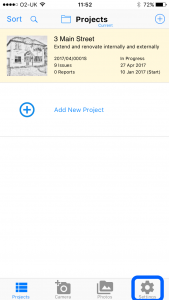
3 Tap In App Purchases to view the upgrade options
Navigate to the In App Purchases section to see the available upgrade options.


4 Tap to purchase the full version
This unlocks 'unlimited' projects, 500 issues per project, use of your own logo and removes the "Produced By" branding from reports.
The In App Purchase screen also allows you to:
- Purchase the Premium Theme Pack which enables all 30 premium themes.
- Restore all Site Report Pro purchases on this device that have been made using another device.
- View all Site Report Pro purchases that have been purchased and available on this device.