How to Archive a Project
Move inactive projects to the Archive folder to keep your current projects list clean. Archived projects remain available for editing.
Method 1: Archive from Project List
1 Swipe right to left on the project
On the Projects list, swipe the project from right to left to reveal the action buttons.

2 Tap Archive
Tap the Archive button to move the project to the archive.

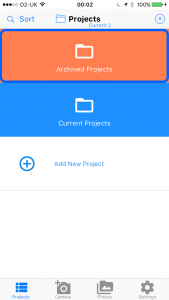
3 View archived projects
To view archived projects, tap Projects (Current) at the top and select Archived Projects.
Method 2: Archive from Project Details
4 Select the project
Tap on the project you want to archive from the projects list.

5 Tap Edit Details
Tap the Edit Details button to open the project details.

6 Scroll to the bottom and tap Archive
Scroll to the bottom of the project details and tap the Archive button.
