How to Assign and Send an Issue
Delegate issues to other Site Report Pro users for updates and resolution. Assigned issues are locked until returned by the assignee.
Assign issues to other Site Report Pro users. The issue will be locked on your device until the other user returns it.
1 Tap Assign
Open the issue and tap Assign.

2 Enter email and send
Enter the recipient's email address and tap Send.
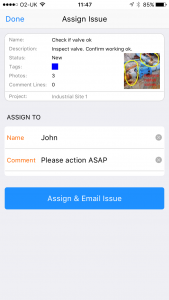
3 Issue sent via email
The issue will be sent via email.

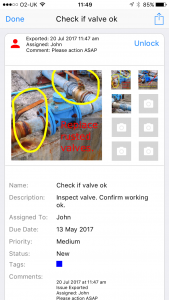
4 Issue locked
The issue will be locked on your device until it is returned.
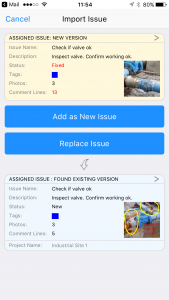
How to Re-import an Assigned Issue
5 Receive email
When the recipient returns the issue, you will receive an email.

6 Copy to Site Report Pro
Tap the attachment and select Copy to Site Report Pro.

7 Issue imported
The issue will be imported and unlocked.