How to Delete a Project
Remove a project and all its associated data permanently. This action cannot be undone.
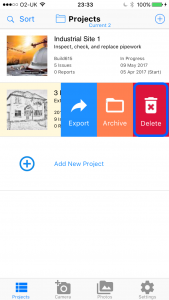
1 Swipe the project from right to left
On the Projects list, swipe the project you want to delete from right to left to reveal the action buttons.

2 Tap Delete
Tap the Delete button to remove the project.
Alternative: Delete via Project Details
3 Open the project and tap Edit Details
Open the project you want to delete and tap Edit Details.

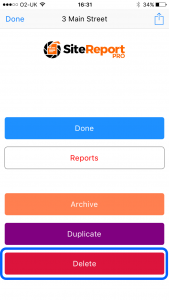
4 Scroll to the bottom and tap Delete
Scroll to the bottom of the project details and tap the Delete button.
Warning: This operation cannot be undone — all project data including associated reports will be permanently deleted. Consider exporting your project as a backup before deleting.