How to Edit Project Details
The project has many attributes that define it (see full list below). The attributes can be added / edited as follows:
1 Select the project you want to edit
Tap on the project from your projects list.

2 Tap Edit Details
Tap the Edit Details button to open the project details editor.

3 Enter the information for the fields as required
You can edit: project name, address, client name, client address, project number, date, notes, company logo and more.

4 Tap Hide Details when finished
Tap Hide Details to save your changes and return to the project view.
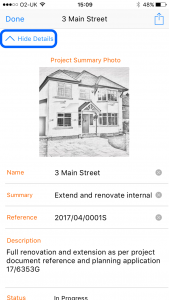
The following information can be defined for a project:
- Photograph
- Name
- Summary
- Reference
- Description
- Status
- Start Date
- Client Company Name
- Client Contact Name
- Client Telephone
- Client Email
- Auditor Name
- Auditor Company Name