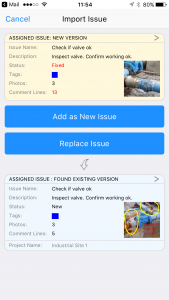
How to Import an Issue Sent by Another User
Import issues sent to you by another Site Report Pro user via email.
When another Site Report Pro user assigns and sends you an issue, you can import it into your project.
1 Open the email
Open the email containing the issue on your iOS device.

2 Copy to Site Report Pro
Tap the attachment and select Copy to Site Report Pro.

3 Issue imported
The issue will be imported and linked to the corresponding project.