Using Site Report Pro on Multiple Devices
Any purchase made on one iOS device is available on any other iOS device that shares the same App Store / iCloud ID. The steps to get Site Report Pro on another device depend on which version you are using.
Trial (Free) Version
If you downloaded the Trial (Free) version and unlocked features via in-app purchase, follow these steps on your other device:
1 Download the app
Download Site Report Pro Trial (Free) on your other device from the App Store.
2 Go to Settings
Open the app and go to Settings.
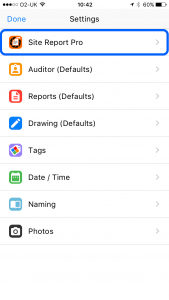
3 Tap Site Report Pro
Select Site Report Pro.
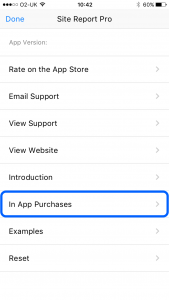
4 Restore Purchases
Tap In App Purchases and then tap Restore Purchases. Enter your iTunes password when prompted. All your previous in-app purchases will be restored.

Plus (Paid) Version
If you purchased the Plus (Paid) version from the App Store, simply download it again on your other device using the same Apple ID. There is no need to restore purchases as the App Store recognises your previous purchase — look for the cloud download icon instead of a price button in the App Store.